One Eye Browser Spy Camera
★ The paid version of One Eye Browser Beta.
★ A browser and camera at the same time!
★ A low-profile spy camera app built for Samsung Galaxy S3!
★ It is probably the best, low-profile, spy cam app for Android!
★ Snap pics while you browse!
Unnoticeably!
☆ Similar to: Spy Phone, Mobile Hidden Camera, DeSpy Camera, Super Spy Camera, Spy Camera, Callcam, SpyCam, SilentSnap Camera, SilentCam, SilentCamera NINJA
———————————————————Device Compatibility WARNING———————————————————This app has been built by using a Samsung Galaxy S 3 for testing.
It may not work correctly for other devices.
So think twice before you commit to buying this app.
Buy this app only if:1.
Youve tried One Eye Beta (free),2.
You like it!3.
You experience *no problems* with it!
And...4.
You accept that the Beta version may get new features first.
———————————————————Features———————————————————
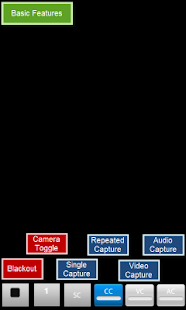
★ Supports: images, video, and audio!
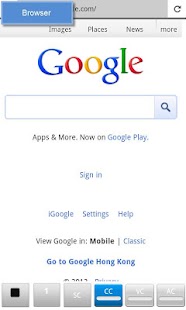
★ Browser with bookmarks support (i.e.
browse news, email, facebook while capturing)
★ Blackout Mode: pitch black screen, stays awake, touch to start/stop.
★ Camera Preview mode
★ Front camera support
★ Continuous shooting
★ No shutter sounds ("Shutter Sound Workaround" for devices that do)
★ Hi-res pics
★ Video recording up to 1080p at 30 fps (incl.
Samsung devices)
★ Vibration/silent notifications
★ Show/hide media in Gallery
★ Customizable hot keys
★ Localizations for France, China (中国), Hong Kong (香港), Taiwan (台灣)
———————————————————Paid Version Additional Features———————————————————
☆ No ads
☆ Unlimited video recording length
☆ Auto-split video files (by time duration or file size)
☆ Shake Detection (reduce the number of blurred pics)
☆ Full list of browser bookmarks
☆ Shortcuts: create shortcuts to One Eye using predefined or customizable preferences.
☆ Extended set of preference parameters
———————————————————To Do List———————————————————
★ Video capture without sound workaround
★ Localization for other languages (e.g.
German, Japanese, Korea, Italian)
———————————————————Troubleshooting———————————————————Send me email with the following info to get prompt response to a problem:1.
Problem description (what did you try to do?)2.
Debug log (Enable Debug Mode and reproduce the problem)
———————————————————Known Limitations———————————————————⇒ Capturing stops when app becomes background.⇒ LED lights may remain on for several seconds when entering Blackout mode.
For Samsung devices, turn lights off: Settings > Display > Touch key light duration⇒ Blurry pics?
Try increasing Continuous Blink Delay.
Enable Shake Detection feature.⇒ Shutter sounds?
Some regional devices deliberately wont allow shutting off the shutter sound via the System volume, so it is a limitation of your device, not this app.
Shutter Sound Workaround 1 and 2 allow you to workaround this problem.
See the apps Help for details.
———————————————————Tips & Tricks———————————————————⇒ Increase Continuous Blink Delay to help produce better quality images by allowing more time for focus and exposure between captures.⇒ Keep your hands steady and enable Shake Detection to reduce blurred output!⇒ Create a shortcut on your desktop to launch One Eye in different profiles.⇒ Change app launch icon by using a shortcut creator app, or launcher such as Go Launcher or Nova Launcher.⇒ Motorola Razr, remember to disable "pocket detect" otherwise video recording stops when that kicks in.⇒ Gallery is slow.
Use faster image viewers: e.g.
QuickPic, Scalado Album
———————————————————Permission Requirements———————————————————⇒ INTERNET and ACCESS_NETWORK_STATE: required for browser⇒ READ_HISTORY_BOOKMARKS: required for listing bookmarks in browser⇒ The rest should be obvious.
About One Eye Browser Spy Camera
- Package name (App ID)
- com.snugsoftware.oneeyer
- Available on
- Google Play
- Price
- Free
- Version
- v1.4.8
- Developer
- Perraco Labs
Looking for the One Eye Browser Spy Camera APK?
The safest way to get One Eye Browser Spy Camera (com.snugsoftware.oneeyer) on your Android device is to install it directly from Google Play — you'll always get the latest official version, automatic updates, and no risk of modified or infected APK files from third-party sites.
Music Features
Enjoy high-quality music streaming and playback features.
Social Features
Connect and share with friends and the community.
Gaming Features
Enjoy immersive gaming experience with various game modes.
See One Eye Browser Spy Camera in Action

Frequently Asked Questions
Is One Eye Browser Spy Camera free?
Yes, One Eye Browser Spy Camera is free to download and install on Android through Google Play.
How do I install One Eye Browser Spy Camera on Android?
Open Google Play on your Android phone or tablet, search for One Eye Browser Spy Camera by Perraco Labs or tap the Google Play button on this page, then tap Install. The app downloads and installs automatically.
What is com.snugsoftware.oneeyer?
com.snugsoftware.oneeyer is the App ID (package name) of One Eye Browser Spy Camera on Google Play. Every Android app has a unique package name, and it is the safest way to verify you are installing the official app.
Is One Eye Browser Spy Camera safe to download?
Installing One Eye Browser Spy Camera from Google Play is the safest option: you get the official version published by Perraco Labs, verified by Google Play Protect, with automatic updates. Avoid APK files from unofficial third-party sites.
Get One Eye Browser Spy Camera Today
One Eye Browser Spy Camera for Android — free download on Google Play.
Compatible with Android phones and tablets — available on Google Play.
Ask AI about this app
Get instant answers about features, tips and more from popular AI assistants.